
Artificial intelligence for building operations
HubDix uses AI in two places: in the assistant, which answers questions about your sites, assets and contracts, and when importing contract documents. In both cases the AI reads and suggests. Deciding and taking responsibility stays with people.
Technical status of a site
"Where should I act first?"
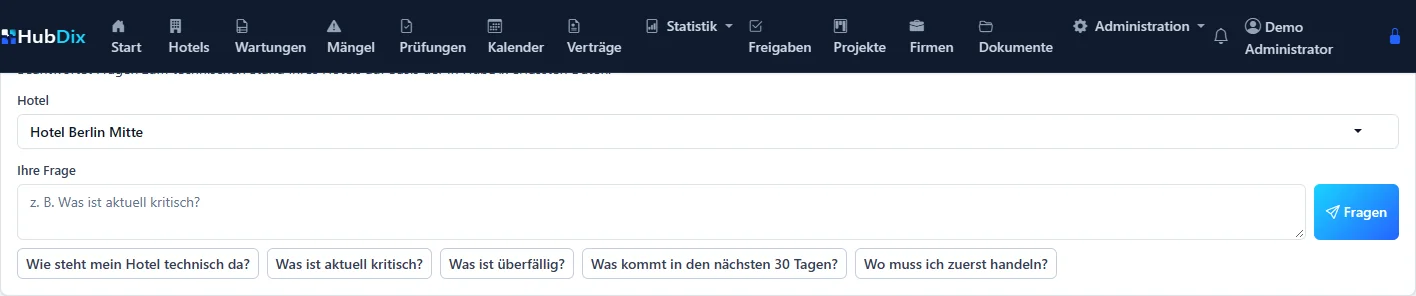
On the start page you choose a site and ask a question – or click one of the quick questions. Below the answer, the relevant records appear as direct links. Follow-up questions refer to the previous answer.
- How is my site doing technically?
- What is critical right now?
- What is overdue?
- What is coming up in the next 30 days?
Technical documents & assets
"What does error code E01 mean?" – with a source.
In the asset details, "Ask AI" puts exactly that asset in focus. The assistant uses its maintenance, inspections, defects and the recognised text of the stored technical documents – operating manuals, data sheets, plans – and names the document a piece of information comes from.
- Summarise the condition of this asset.
- Which model is installed, and who is the manufacturer?
- Which maintenance intervals does the documentation specify?
- The current defect says error E01 – what does that mean?
What the asset AI uses
- HubDix operating data for the asset – the same figures as in the asset details
- only documents marked "AI-readable" that you are allowed to open yourself
- for error codes, specifically the passages where they appear
What it does not do
- re-read a PDF or load anything from the internet
- present general knowledge as manufacturer information
- make repair, replacement or decommissioning decisions
If information is neither in the data nor in the documents, the assistant says so explicitly.
Maintenance, inspections, contracts
Questions on every module page – with the right data area.
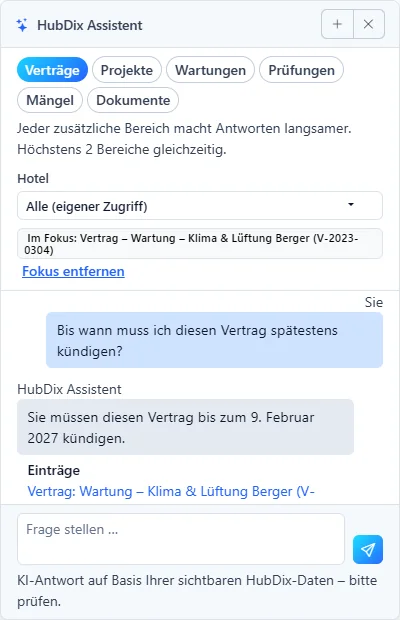
On sites, assets, maintenance, inspections, contracts and projects, the assistant opens with the matching area. Up to two areas can be combined, for example contracts and documents. An opened record automatically becomes the focus for follow-up questions.
- Which inspections are overdue?
- Which notice periods expire soon?
- By when must I give notice on this contract?
- Which document mentions liability?
If someone asks about an area that is not active, the assistant does not guess but offers to add the area.
Contract capture
Recognise contract data in PDF documents.
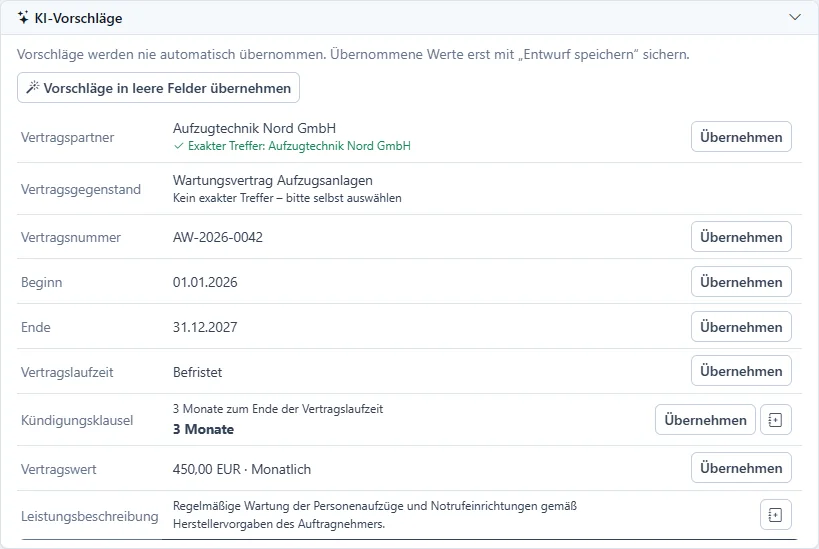
During contract import, HubDix recognises a document's text – including OCR for scans – and analyses it. The AI suggests contract partner, subject, number, term, notice period, contract value and clauses. For ZIP imports, it also checks cautiously whether a document is a contract at all.
- Suggestions are kept separate from the fields and never saved automatically
- Accept with a click – or fill only empty fields
- The original PDF always alongside for comparison
Permissions
The assistant never sees more than you do.
The assistant has no database access of its own. For every single question, HubDix assembles a suitable, permission-checked data extract – by the same rules as the lists. Only that extract is evaluated.
Site access
Site selection can only narrow access, never widen it.
Permissions & modules
An area is only offered if module, menu item and read permission match.
Documents
Only documents you may open – for contracts, additionally by department.
Read-only
No cancelling contracts, no closing defects, no approvals, no messages.
The conversation history only helps to understand follow-up questions. Facts are read fresh and up to date for every question.
Operation & data protection
One connected service – designed for locally operated language models.
Text recognition and AI run via a document processing service connected by the administrator of your HubDix instance. It is designed to run with locally operated language models; with local operation there are no per-request fees. Where data goes depends on where this service is operated – something to clarify with us and your data protection officer.
- Documents only go to the one configured service, and only in defined situations
- Only technical metadata is logged for AI requests – not questions or answers
- Conversations are personal and deleted after 30 days of inactivity
- Without a connected service, all uploads keep working
| Situation | What is sent |
|---|---|
| Text recognition | the PDF file |
| ZIP contract import | files to be converted and recognised text for the contract check |
| Contract analysis | recognised text of the draft and the site name |
| Assistant | your question, a short conversation history and the permission-checked data extract |
AI can make mistakes. It may misinterpret wording, mix up data or miss something. Check important answers – especially on deadlines, amounts, contract clauses and safety-related information – against the original; the records below each answer lead straight to it.
FAQ
AI in HubDix
Does the AI make decisions?
No. The assistant is strictly read-only and makes no legal or technical decisions. In contract import, the AI provides suggestions that a person must accept.
Can the assistant see data from other sites?
No. For each question, a data extract is assembled according to your permissions. Sites, departments and documents outside your access are not included.
Which AI models does HubDix use?
HubDix does not choose a model. Which model answers a question is decided solely by the connected document processing service, which is designed for locally operated language models.
Does the assistant read scanned documents?
Yes, if their text has been recognised. Scanned PDFs are read via OCR and the text is stored once. A document without recognised text cannot be evaluated by the assistant.
How fast does the assistant answer?
That depends on the question, the number of active areas and the load – from a few seconds to a few minutes. Each additional area makes answers slower.
See HubDix for yourself.
The demo is a complete instance with fictitious sites and data. For questions about your operation, your installations and your processes, write to us.
The demo is set up for hotels – features and handling are the same in every industry.