
Vendor management and external work orders
One vendor register for every area, external work orders via time-limited link, and automatic maintenance assignment that only does what you have set up and reviewed.
Vendor register
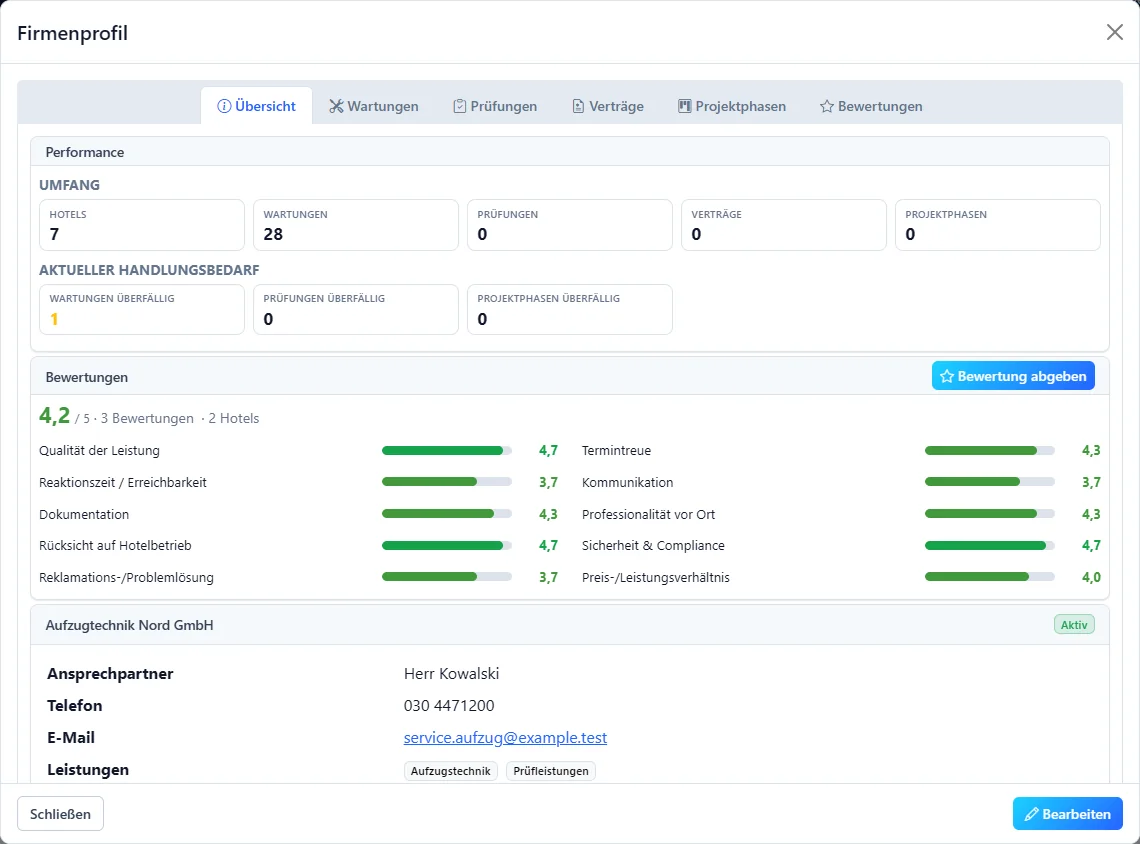
One entry per vendor – for maintenance, inspection, contract and project.
Maintenance, inspections, contracts and project phases all refer to the same vendor entry. There are no copies of vendor names or contact details in individual areas. Vendors are never deleted, only deactivated – existing links remain.
- Services per vendor, for example lift engineering, fire protection, inspection services
- Vendor profile with sites served, maintenance, inspections, contracts, project phases and reviews
- "Select vendor": active vendors with the matching service already working at your sites
External work orders
One link, one job, one clear response.
Maintenance, an inspection or a defect repair is sent to a vendor as an external work order. The vendor opens their personal link on a computer or smartphone – no sign-in, no app – and sees only that one job.
- Assign a vendorTask, "due by", "access valid until", recipient and email language (German or English). Documents for the vendor can be attached.
- Send accessAfter checking the recipient address, the vendor receives an email with work order number, address, asset, task, deadline and on-site contact.
- Vendor documentsResult, remark, report and photos – including straight from the camera. Internal comments, costs or other records are never shown.
- Vendor reports completionFor maintenance and inspections, exactly one history entry is created; the next due date is recalculated.
- Confirm internally or request reworkConfirmation closes the vendor's access. For rework, the vendor sees your reason and reports again.
Permanent order number
Every work order gets a fixed number such as HD-2026-001284 – findable in the work order list and in the maintenance, inspection and defect lists.
Deadline and access kept apart
The work can be overdue while the vendor can still upload their report until access expires.
Access revocable at any time
Sending a new link invalidates the old one immediately. After confirmation or revocation the link only shows "not valid".
Central work order list
All external work orders in one place.
The "External assignments" page shows every work order for the sites you can access – with key figures for open, due today, overdue, confirmation required and rework. Search by order number, vendor, site, asset and task; quick filters for what is urgent.
New work orders are created in a few steps but are always tied to an existing maintenance record, inspection or defect. If a work order is already running for a record, HubDix does not create a second one.
Automatic maintenance assignment
Recurring maintenance assigns itself – once you have approved it.
For maintenance with a calculated next due date, HubDix creates the external work order ahead of each due date, sends the access link, reminds the vendor according to your settings and alerts you if it becomes overdue.
- Never on its own: vendor, recipient, lead time, deadline and reminders are set up, the preview checked and actively confirmed
- At most one work order per due date – no second one while one is open
- Failed creation or sending is reported
- Maintenance only – not for inspections or defects
Facts, not scores
How reliable is a vendor? The data shows it – without a ranking.
HubDix strictly separates objective figures from subjective internal reviews. Both are shown side by side but never combined into one overall value.
Execution from external work orders
Work orders, punctuality, response time until the link is opened, reports, reminders and overdue open orders – filterable by period, origin and type, each figure with the underlying work orders.
- The deadline valid at the time of completion counts
- Orders sent after the deadline are "not fairly assessable"
Internal reviews
Structured reviews on a scale of 1 to 5 in categories such as quality, punctuality, communication or documentation. Only people at a site where the vendor actually works can review it.
- Averages always shown with the number of reviews
- Reviews cannot be changed once saved
There are no automatic star ratings, no vendor score and no ranking. The facts support your own judgement.
FAQ
External work orders with HubDix
Does the vendor need a HubDix account?
No. The vendor receives a personal, time-limited link by email and works in the browser – without signing in and without an app. They see only that one work order.
Can the vendor close a defect themselves?
No. The vendor reports the repair. An internal HubDix user confirms it; until then the defect stays open.
What happens to the vendor's report?
For maintenance and inspections, report, photos and evidence appear on the automatically created history entry. Files submitted later are added. Findings never create a defect automatically.
Are vendors reminded automatically?
Automatic reminders apply to work orders from automatic maintenance assignment. For all other work orders you remind the vendor with one click, at most once a day.
See HubDix for yourself.
The demo is a complete instance with fictitious sites and data. For questions about your operation, your installations and your processes, write to us.
The demo is set up for hotels – features and handling are the same in every industry.