
Features for digital building management
Every feature works with the same sites, assets, people and vendors. No duplicate data entry and no conflicting deadlines.
Know where you stand
For managers responsible for several sites.
Operations cockpit
Daily summary, key figures, technical status overview, timeline and quick actions on the start page.
Sites & technical status
Four states with reasons, master data, responsible persons, site groups, documents and plans per site.
Technical assets & history
Asset list across all sites, asset details with key figures and history, optional individual units with serial number.
Statistics & reporting
Six statistics pages for sites, assets, maintenance, inspections, defects and contracts – with a period filter.
Meet deadlines, keep evidence
For technical managers and building services.
Maintenance management
Intervals from six times a year to every ten years, history with reports, automatic calculation of the next maintenance date.
Maintenance & inspectionsInspection management
Assets subject to inspection with inspector type, a three-level result, regular and follow-up inspections.
Inspections in detailDefect management
A central defect register with origin from maintenance, inspection, project or daily operations, with deadline, costs and evidence.
Defects & approvalsCalendar & reminders
Due dates from every area as month, week or list – "My calendar" or team calendar, with reminders to the people responsible.
Control budgets and obligations
For management, purchasing and controlling.
Approvals & cost control
Approval limits per role, responsibilities per site, no self-approval, complete history.
ApprovalsContract management
Term, notice period, latest notice date, automatic renewal, contract value and history.
Contract managementAI-assisted contract import
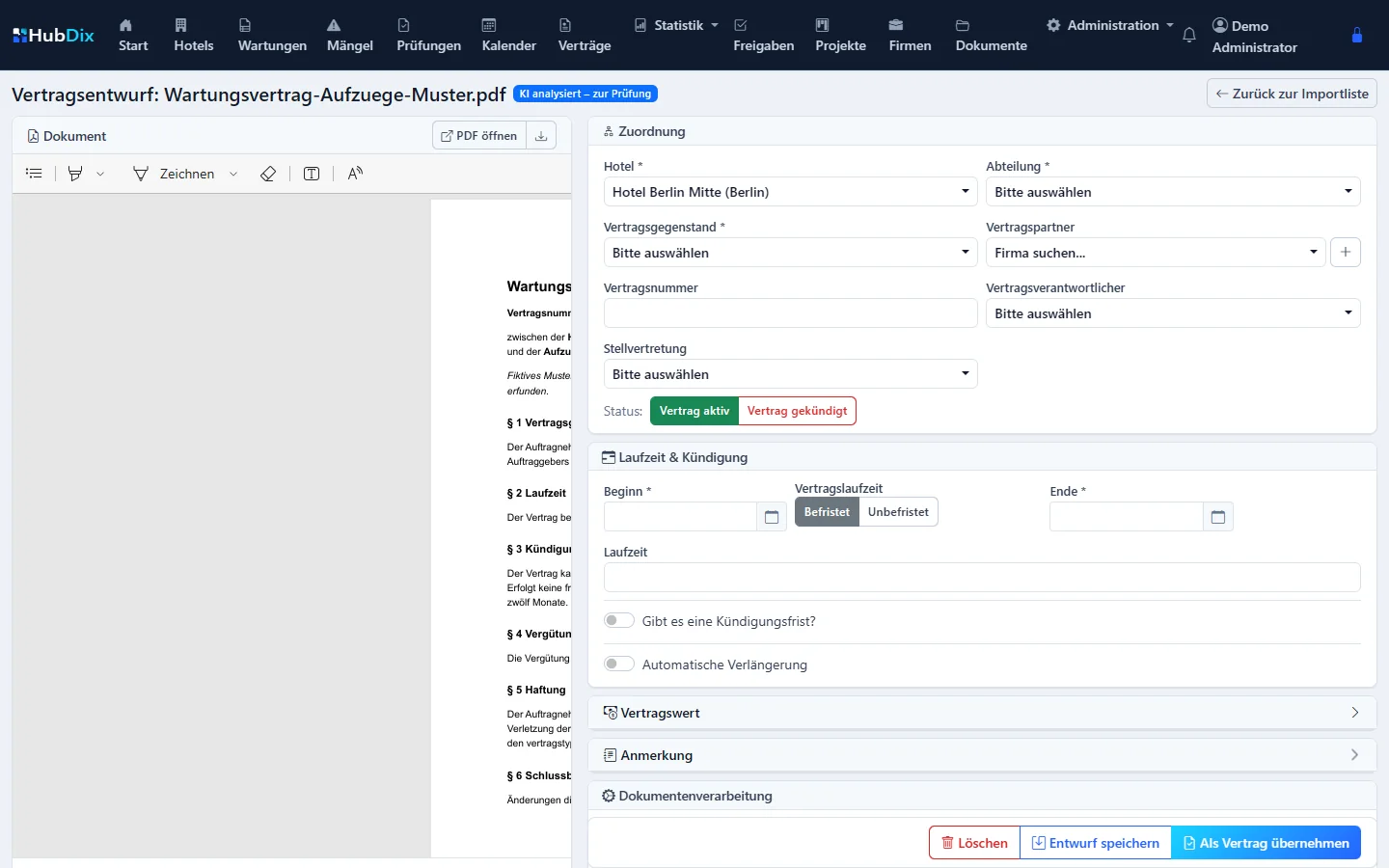
PDF or ZIP upload, text recognition, AI suggestions for the contract fields – only what a person confirms is saved.
Contract importProject management
Phases, checklists, risks, decisions, baseline, change requests with approval and a cost overview.
Project managementInvolve vendors, keep teams informed
For everyone who works with service providers.
Vendor management
A central vendor register with services, vendor profile, objective execution facts and separate internal reviews.
VendorsExternal work orders
Assign maintenance, an inspection or a defect repair via time-limited link – the vendor needs no user account.
External work ordersAutomatic maintenance assignment
For recurring maintenance, HubDix creates the work order ahead of each due date – after deliberate setup and review.
AutomationNotifications
Personal and addressed to the people responsible, never to entire roles. Sent by email as well if unread after 24 hours.
Find documents, get answers, work on the move
For everyone who needs answers – at the desk and on site.
Document management
Documents live on their record. The document centre searches file names and recognised PDF text, with highlighted excerpts.
AI assistant
Questions in plain language about sites, assets, maintenance, inspections, contracts, projects and documents.
Artificial intelligenceMobile progressive web app
Installable on Android and iPhone: tasks, defects with photos, recording maintenance and inspections, projects and calendar.
Mobile appRoles & permissions
Roles, permissions, site and department access – applied consistently in lists, documents, calendar, statistics and assistant.
PermissionsDocuments
One place for all evidence – no filing by gut feeling.
Reports, contracts, plans, photos and technical documentation are always uploaded on the relevant record. Every file is clearly assigned and only visible to people allowed to see that record.
- Document centre with filters by period, site, area and processing status
- Full-text search in the recognised text of PDFs, including scanned documents via OCR
- Technical documentation per asset, shared by maintenance and inspections
- Visible processing status: AI-readable, processing, no text available
Search is word-based, without AI. Allowed file types: PDF, JPG and PNG.
See HubDix for yourself.
The demo is a complete instance with fictitious sites and data. For questions about your operation, your installations and your processes, write to us.
The demo is set up for hotels – features and handling are the same in every industry.