
Maintenance and inspection management software
Record the interval, document completed work with a report – HubDix calculates the next due date, reminds the people responsible and shows the status on the start page, calendar and statistics.
Organising operator duties
One maintenance record per site and asset type – with a complete history.
Lifts, fire alarm system, ventilation or drinking water: each combination of site and asset type has exactly one record for maintenance and one for inspection. The history shows every completed job with vendor, result, report and any defects found.
Product rules from the current feature set – not performance or customer figures.
Maintenance
Done, documented, recalculated.
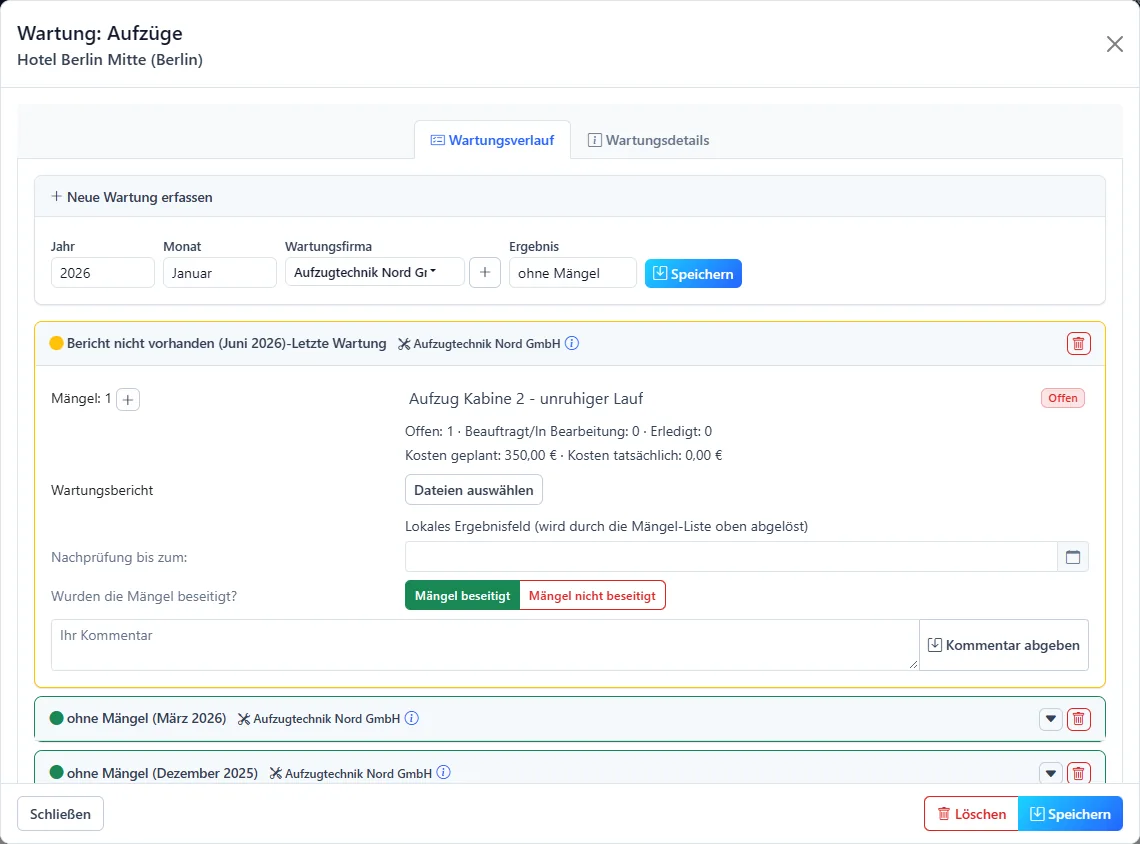
Under "Record new maintenance" you enter the year, the month for multiple-times-a-year intervals, the maintenance vendor and the result. The report, defects, an optional re-inspection date and comments are attached to the entry.
| Next maintenance | last recorded maintenance (or start of maintenance) plus one interval |
|---|---|
| Exception | if "re-inspection by" is set, that date applies |
| Recalculated | whenever a history entry is saved, changed or deleted |
If the last maintenance was long ago, the calculated date is deliberately in the past – the asset stays overdue until new maintenance is recorded.
Inspections
Assets subject to inspection, with inspector, result and follow-up.
Inspections work like maintenance and cover assets that require statutory or regular inspection – for example by competent persons, specialist firms or expert organisations. Legionella testing is managed as a separate asset type.
- Result: no defects, minor defects or major defects
- Inspection type: regular inspection or follow-up inspection
- "Re-inspection by" becomes the next due date
- Defects from an inspection go into the central defect register – linked to the inspection
- Inspection report as PDF on the history entry, searchable after text recognition
| Feature | Maintenance | Inspection |
|---|---|---|
| Interval & calculation | yes | yes |
| Result | without / with defects | none / minor / major defects |
| Inspector or inspection type | – | inspector, regular or follow-up |
| External execution | yes | yes |
| Automatic assignment | yes, for recurring maintenance | no |
| Record on mobile | yes | yes |
External execution
The vendor reports completion – the history fills itself.
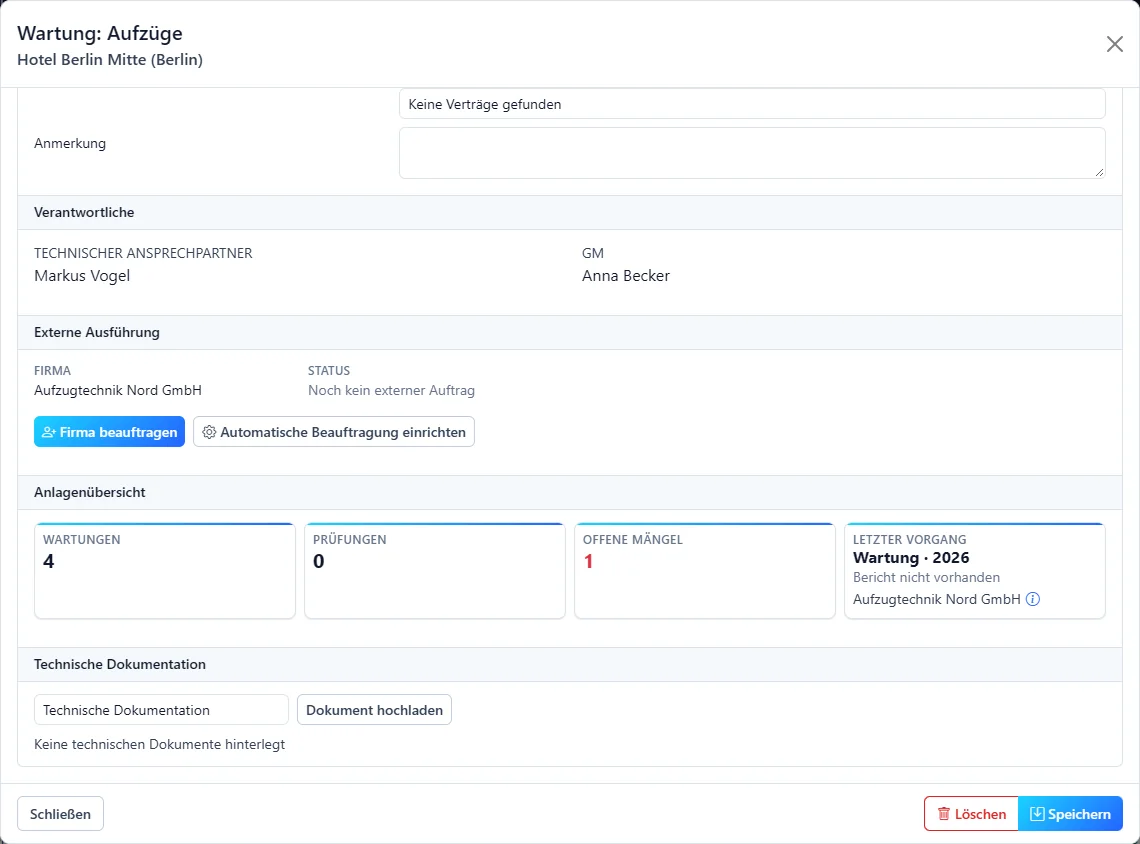
From the maintenance or inspection details, an external work order goes to a vendor from your vendor register. When the vendor reports the work as done, HubDix adds vendor, date, result, remark and report to the history automatically and recalculates the next due date.
- Internally you only review and confirm – or request rework
- "Not executable" creates no history entry
- Findings never create defects automatically – your team decides
In everyday use
What an overdue inspection triggers.
Status
The site becomes "critical" – with the reason "overdue inspection".
Notification
To the site's general manager and technical contact – not to the inspection company.
Calendar
The entry stays visible as overdue until the inspection is recorded.
Statistics
Overdue inspections by site and asset type, completions per month.
FAQ
Maintenance and inspection management with HubDix
Is HubDix a classic CAFM system?
No. HubDix is deliberately not a classic asset register. Maintenance and inspections are assigned to an asset type per site; the focus is on deadlines, evidence, responsibilities and the technical status derived from them. Individual units can optionally be tracked separately.
Does HubDix fulfil my operator duties automatically?
No. HubDix organises deadlines and evidence and makes required action visible. You decide which inspections and intervals apply to your assets; responsibility remains with the operator.
How is the next maintenance date calculated?
Last recorded maintenance – or, without history, the start of maintenance – plus one interval. If "re-inspection by" is set, that date applies. It is recalculated whenever a history entry is saved, changed or deleted.
Can maintenance be documented on mobile?
Yes. In the mobile app you record completed maintenance or an inspection with result and vendor, attach photos or the report and create a defect directly if needed. Creating and changing maintenance records stays in the browser view.
What happens to archived assets?
Archived maintenance and inspection records are read-only. History, reports and defects remain visible but no longer count towards due dates, status and key figures.
Read on
From features to workflows
How the features work together in operation – plus templates to get started.
See HubDix for yourself.
The demo is a complete instance with fictitious sites and data. For questions about your operation, your installations and your processes, write to us.
The demo is set up for hotels – features and handling are the same in every industry.