
Inspection management from scheduling to follow-up
An inspection date is only the beginning. A reliable workflow connects preparation, execution, the report and the handling of findings – all the way to the re-inspection.
The problem
Dates without a closing chain
An inspection can take place on time and still leave work open. The report arrives days later, the installation has a different name in the document than in the plan, and a finding needs a decision nobody has explicitly taken on.
If you only tick off the date, you lose exactly these follow-up steps. Inspection management therefore means linking every inspection to a clearly identified installation and treating the review of the result as a step of its own.
Typical gaps in day-to-day work
- Inspection done, but the report is still in one person's inbox
- A finding is in the PDF, but nobody owns the repair
- The re-inspection date only exists in a personal calendar
- The report names the installation differently from the plan
- “Done” means something different at every site
The workflow
Prepare inspections and assign their results
Five steps found in every operation – and what HubDix records at each of them.
Define
Installation, inspection type, inspector and interval are determined by qualified people and recorded.
One inspection per site and asset typeBecome due
30 days ahead the inspection counts as “due soon” – in the list, the calendar and on the home page.
One due date everywhereCarry out
Internally or as an external assignment: the inspection company receives a link and reports its result.
External executionDocument
Outcome in three levels, inspection type and the report as a PDF on the history entry.
Searchable reportFollow up
Your team creates defects. “Re-inspection by” becomes the next due date.
Link to the inspection kept
In HubDix
What belongs to an inspection record
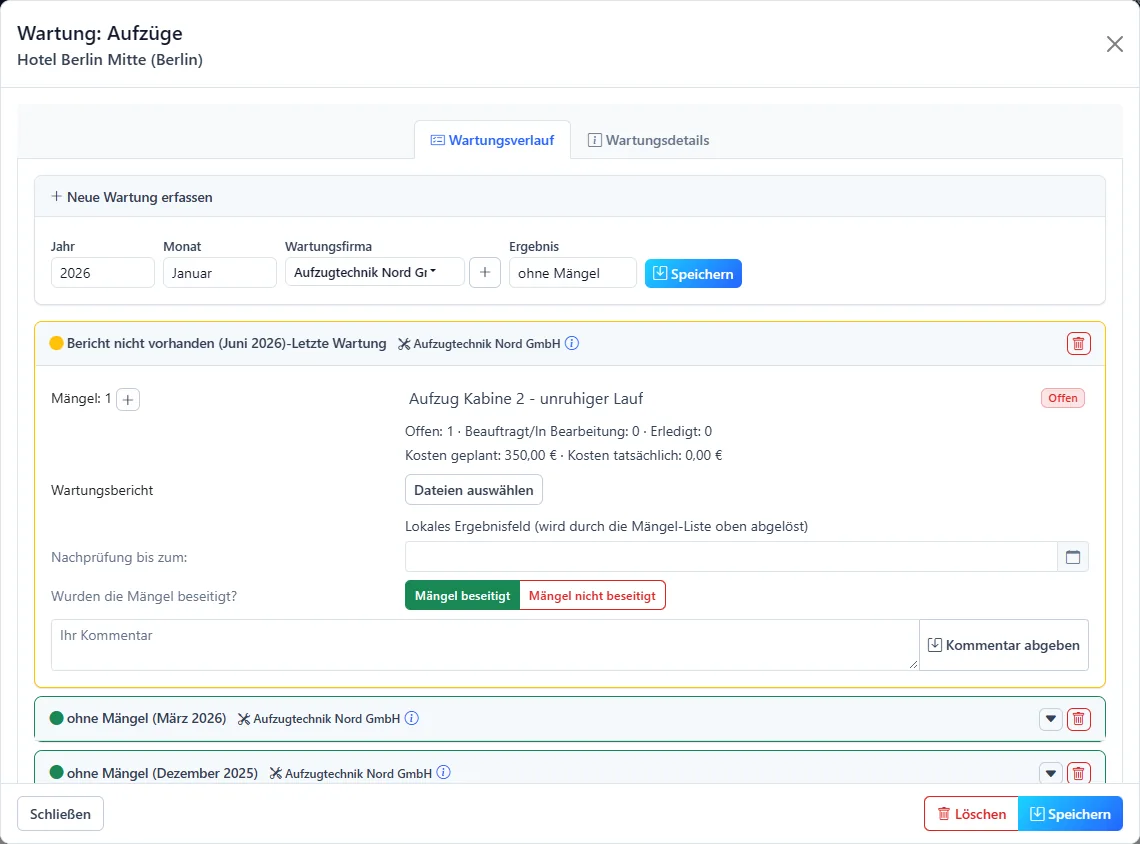
Inspections work like maintenance in HubDix: one inspection per site and asset type, with a history of every inspection performed. Each entry records who inspected, with what outcome and on what basis.
- Outcome: no defects, minor defects or major defects
- Inspection type: routine inspection or re-inspection
- Inspection report as a PDF, searchable after text recognition
- Defects from the inspection in the central defect register – linked to it
- Legionella testing as an asset type of its own
The screenshot (German UI) shows a maintenance history; the inspection history has the same structure and adds inspector and inspection type.
Fictitious example
Example: re-inspection after an objection
A routine inspection ends with minor defects and a required re-inspection. This is how the chain from finding to new inspection result stays traceable in one place.
- Day 0Inspection recordedOutcome “minor defects”, report as a PDF on the history entry, “re-inspection by” set.
- Day 1Defect createdThe team assesses the finding and deliberately creates a defect with an owner and a deadline.
- Day 12Repair confirmedThe assigned company reports the repair; an internal user reviews and confirms it.
- Day 25Re-inspection documentedNew history entry with inspection type “re-inspection”. HubDix then recalculates the next due date.
Result: the first report is kept. Whether the installation may continue to operate is assessed by the responsible expert – not by a calendar colour.
Framework
Do not generalise deadlines and evidence
The software supports the workflow you define. This page does not prescribe universal inspection intervals.
German legal basis, using the BetrSichV as an example
For work equipment within the scope of the German Industrial Safety Regulation, § 3 BetrSichV governs the risk assessment and the definition of required inspections. § 14 BetrSichV sets requirements for inspections and their records. Which rule applies to a specific installation must be assessed by a qualified person; other countries have their own rules.
Sources checked: 18 November 2026
What HubDix organises
- Due dates, reminders and calendar
- History with outcome, inspector and report
- Defects with deadline, owner and approval
What stays with you
- Which inspections and intervals apply
- The inspector's qualification
- Assessing findings and continued operation
FAQ
Inspection management with HubDix
Does HubDix prescribe statutory inspection intervals?
No. Applicable intervals must be determined by qualified people. HubDix manages the recorded intervals and due dates and makes overdue items visible.
Does every finding automatically become a defect?
No. The assessment and the creation of a defect are deliberate decisions by your team. The defect keeps its link to the inspection.
Can an external inspection company enter its result directly?
Yes, through an external assignment. The company opens a personal, time-limited link without logging in and reports the outcome and report. This creates exactly one history entry; internally you confirm or request rework.
Are inspections assigned automatically?
No. Automatic assignment exists only for periodic maintenance. Inspection assignments are issued deliberately, one at a time.
Read on
Related resources
The features behind this workflow and resources to get started.
See HubDix for yourself.
The demo is a complete instance with fictitious sites and data. For questions about your operation, your installations and your processes, write to us.
The demo is set up for hotels – features and handling are the same in every industry.