
Distinguish recognition, analysis and review
Behind “AI reads the contract” are three different steps, each with its own sources of error.
- Text recognition
- Makes a document's text accessible – embedded or via OCR for scans.
- Error source: poor scans, stamps, handwriting.
- AI analysis
- Detects relevant details and assigns them to fields.
- Error source: annexes, amendments, conflicting clauses.
- Review
- A person compares suggestions with the original and confirms.
- Only then does binding data exist.
So do not just check whether a field is filled. Compare counterparty, term, deadline and assignment with the original document. Missing information stays open for clarification.
Three dates that are often confused
| Date | Meaning | In HubDix |
|---|---|---|
| Contract end | end of the agreed term | from start and term |
| Latest notice date | last day on which notice can be given | contract end minus notice period, or set explicitly |
| Reminder | internal date for the decision | 14 days before by default, 1–730 days per contract |
Set up a controlled acceptance process
With the AI-assisted contract import, HubDix creates a draft for every document. Suggestions are kept separate from the fields; you accept them individually or fill only empty fields.
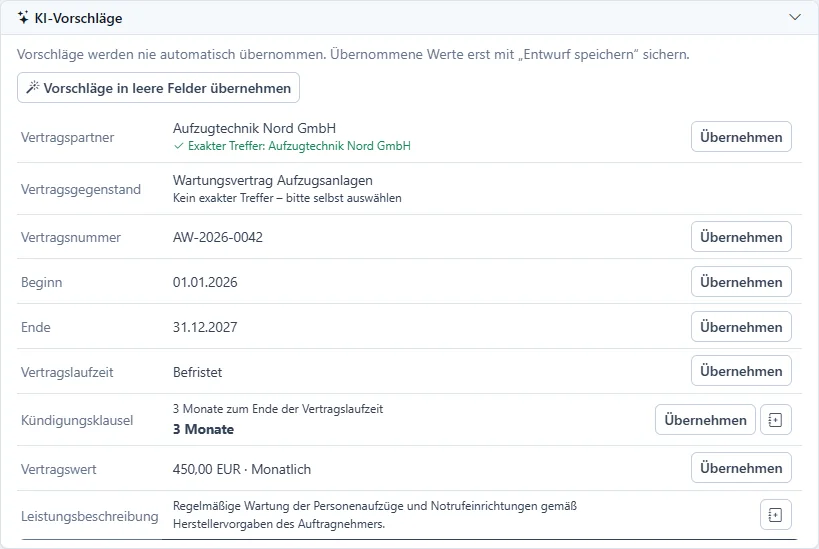
- Suggestions are never saved automatically – neither in the draft nor as a contract
- “Fill empty fields” never overwrites values that are already filled
- Re-running the analysis replaces only the suggestions, never your input
- A contract only exists after “Accept as contract” – with a warning about possible duplicates
Decide internally who reviews the data and when a specialist is involved.
Example: notice period with an amendment
A main contract specifies a term; a later amendment moves the notice date. A suggestion generated from the main document is then incomplete.
The reviewer takes both documents into account and sets the different notice date manually. After that, the workflow needs an owner for the decision before the deadline – a reminder alone does not terminate a contract.
Limits and sensible use
AI support is suited to preparation and research. It does not replace a legal contract review and does not guarantee complete or error-free analysis. The HubDix assistant answers questions about clauses using the recognised contract text – read-only and only within your permissions. There are no autonomous contract changes or automatic terminations.